Project View
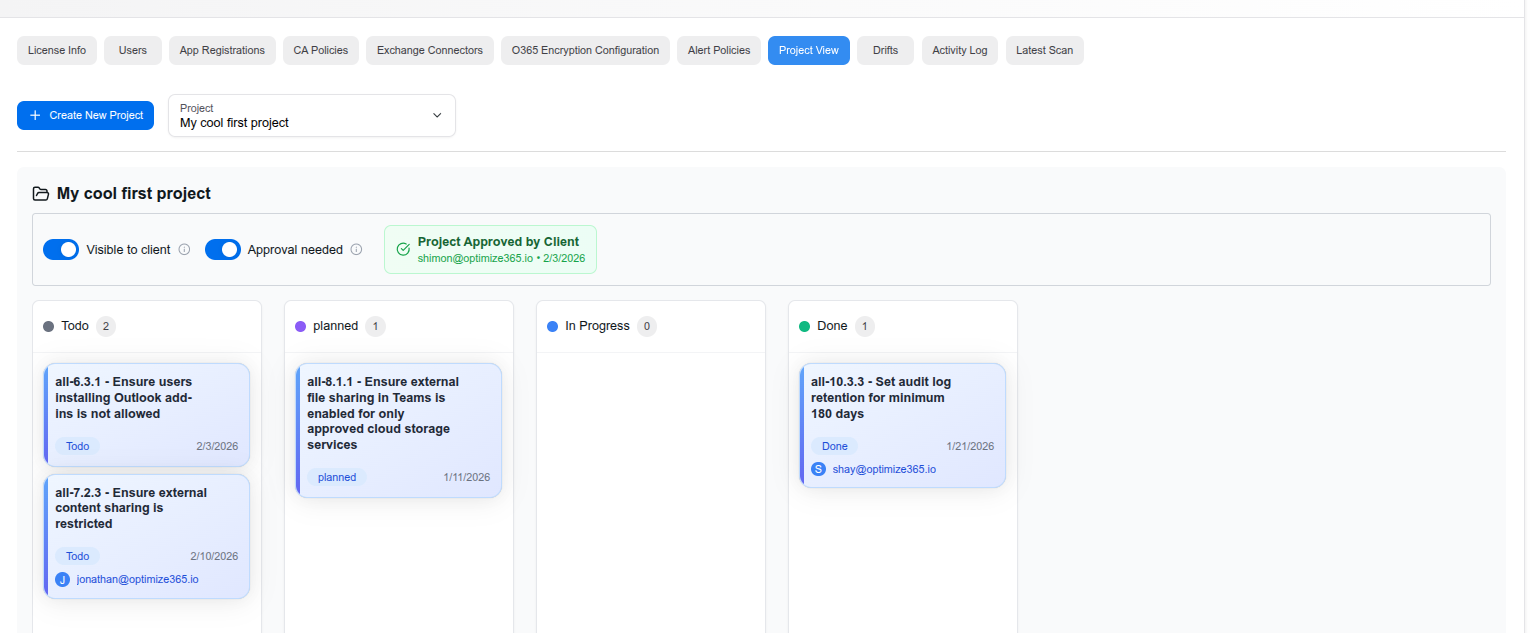
The Project View tab provides a kanban-style board for organizing and tracking remediation work. It allows MSPs to group security controls into projects, assign tasks, and collaborate with clients on remediation priorities.
Creating Projects
Click “Create New Project” to start a new remediation project. You can switch between projects using the dropdown selector at the top of the page.
Project Settings
Each project has configurable options:
- Visible to client — Toggle to make the project visible in the Client Portal, giving clients transparency into ongoing remediation work
- Approval needed — Toggle to require client approval before work begins on the project
- Project Approved by Client — Shows approval status with the approver’s email and date
Kanban Board
Remediation tasks are organized into four columns:
- Todo — Controls that need to be addressed
- Planned — Controls that have been scheduled for remediation
- In Progress — Controls currently being worked on
- Done — Controls that have been successfully remediated
Task Cards
Each card on the board represents a security control and shows:
- Control ID — The specific control reference (e.g., all-6.3.1)
- Description — What the control checks for
- Status — Current column/status
- Date — When the task was created or last updated
- Assignee — The team member responsible for the remediation
Last updated on