Conditional Access Policies
The CA Policies tab displays all Conditional Access policies configured in your client’s Microsoft Entra ID tenant. This view helps you understand the security rules in place and identify potential gaps in access control.
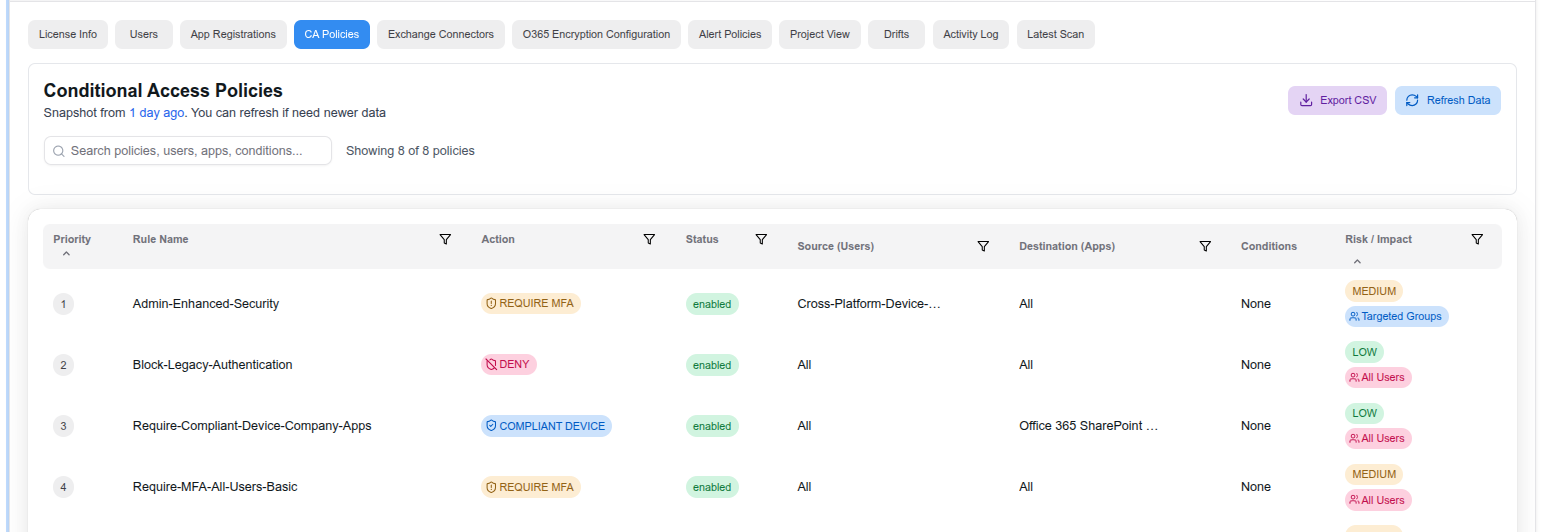
Policy Table
Each policy is displayed with the following details:
- Priority — The evaluation order of the policy
- Rule Name — Descriptive name of the policy
- Action — The enforced action, color-coded by type:
- REQUIRE MFA — Requires multi-factor authentication
- DENY — Blocks access entirely
- COMPLIANT DEVICE — Requires a compliant or managed device
- Status — Whether the policy is enabled or disabled
- Source (Users) — Which users or groups the policy targets (e.g., “All”, specific groups)
- Destination (Apps) — Which applications the policy applies to
- Conditions — Additional conditions such as device platforms or locations
- Risk / Impact — Risk level assessment (High, Medium, Low) and scope of affected users
Features
- Search and filter — Search across policies, users, apps, and conditions
- Export CSV — Download the full policy list for offline review or reporting
- Refresh Data — Pull the latest policies from Microsoft Entra ID
- Snapshot timestamp — Shows when the data was last fetched so you know how current it is
Last updated on